


I approached Church's Texas Chicken® as the sort of app you open when dinner is already a practical problem rather than a browsing hobby. Its job is straightforward: help me order Church’s Texas Chicken for pickup or delivery, while giving regular customers a way to use Real Rewards™. After spending time with it, my overall view is positive, but with an important qualification: it works best when I already know I want this restaurant. It is less useful as a general food-discovery tool.
This is a free Food & Drink app from Cajun Operating Company, rated 4.9 on average from around 38 thousand ratings and more than 4 thousand written reviews. That level of response, together with over a million installs, suggests it has become a familiar ordering option for a substantial customer base. My own recommendation is fairly clear: if Church’s is one of your usual choices, the app is worth keeping. If you only want to compare every nearby restaurant in one place, a broader delivery service may fit your habits better.
What the app gets right when I need chicken quickly
The strongest part of the experience is the direct path from craving to order. Instead of searching through a general marketplace, I can focus on Church’s menu, choose between pickup and delivery, and finish the transaction in the restaurant’s own environment. That narrower purpose is also its advantage. There is less distraction than in an app filled with unrelated restaurants, and the experience feels designed around one particular type of meal.
I find this especially useful for repeat orders. When I already have a preferred combination in mind, I do not need to spend time comparing menus that I have no intention of choosing. The app gives me a more focused route to the restaurant, which is valuable when I am ordering during a busy lunch break or trying to organize food for a household without turning the decision into a long conversation.
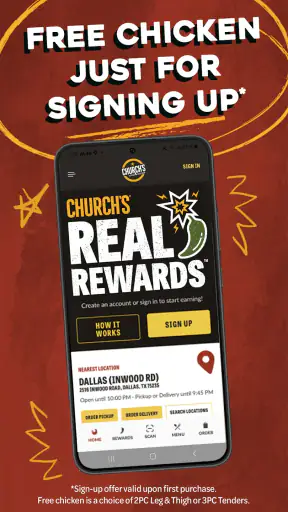
The store summary emphasizes online ordering, pickup, delivery, and Real Rewards™. In practical terms, that combination makes the app more than a digital menu. It is a place to manage the whole ordering moment: decide what to eat, select how to receive it, and keep the order connected to the restaurant’s rewards system. The real strength is convenience for returning customers, not endless choice.
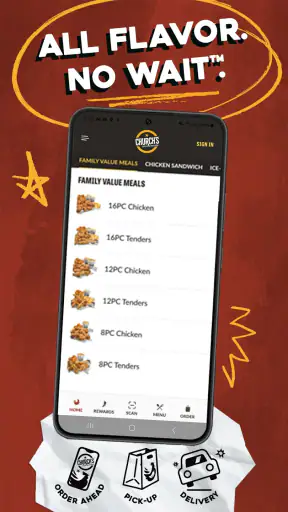
I also appreciate the distinction between pickup and delivery. They solve different problems, and having both routes in the same app makes the choice easier. Pickup is the sensible option when I am already passing a location or want to avoid waiting at home. Delivery is more useful when I am working, looking after children, or simply do not want to leave the house. A dedicated restaurant app can make that decision feel more immediate than switching between several services.
Real Rewards™ is most valuable when ordering becomes a habit
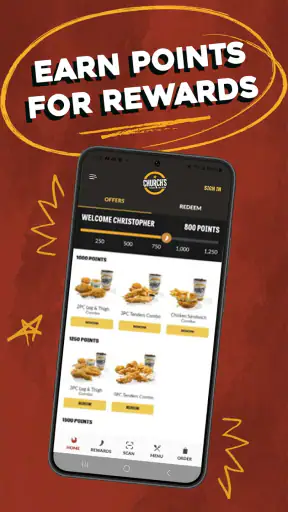
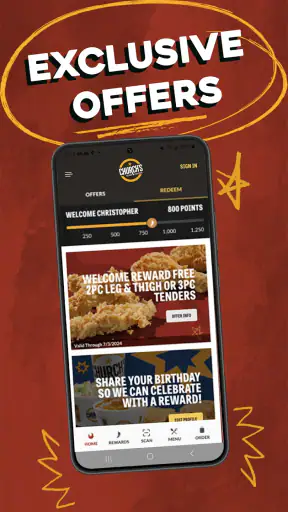
The rewards element changes how I judge the app. For a one-time customer, it may not be enough to justify installing another food app. For someone who orders Church’s regularly, however, keeping the official app can make more sense than repeatedly using a guest checkout on a third-party platform. The benefit is not just the order itself; it is having a consistent place to return to when I want the same restaurant again.
My practical advice is to treat the rewards account as part of the ordering workflow rather than an afterthought. I would sign in before building a complicated order, make sure the selected restaurant is the intended one, and check the reward-related details before submitting. That small habit reduces the chance of completing an order first and only afterward realizing that the account or reward choice was not applied as expected.
This is also where the app is more useful for households than it may initially appear. If several people are eating, the person placing the order can keep the process centralized instead of asking everyone to search separately. For a family meal, I would decide the restaurant location and pickup or delivery method first, then build the order carefully, checking the final basket before paying. That sequence helps avoid the common mistake of assembling food before noticing that the chosen location is inconvenient.
A weekday scenario where the focused design makes sense
Imagine I finish work later than planned and need food for myself and two other people. I already know Church’s is acceptable to everyone, so I do not need a restaurant comparison screen. I open the app, choose the location that makes sense for pickup or delivery, build the order, and review it before sending it. If I use Church’s often, the rewards account gives me another reason to keep this route instead of starting from a general delivery marketplace each time.
That scenario shows the app at its best. It removes unnecessary decisions without pretending to solve every food-ordering need. The experience is particularly well suited to a predictable routine: a regular lunch, a family dinner, or a planned pickup on the way home. It is less compelling when I am undecided and want to explore cuisines, compare delivery fees, or discover restaurants I have never tried.
The important limitation: this is not a complete food marketplace
The same focus that makes the app efficient can make it feel narrow. I cannot use it as a neutral comparison tool across different restaurants, and I would not open it when my main question is “What should I eat tonight?” It answers “How do I order from Church’s?” much better than it answers “Which nearby restaurant offers the best overall option?”
That distinction matters because convenience is personal. If I value seeing multiple delivery choices, comparing estimated totals, or combining orders from different restaurants, a general delivery app may be more useful. The official Church’s app is the better choice when loyalty and direct access matter more than broad comparison. Neither approach is universally superior; they serve different ordering habits.
I also recommend taking a moment to inspect the order before confirming it. Restaurant ordering is vulnerable to simple errors: selecting the wrong location, choosing pickup when delivery was intended, or overlooking an item in a larger group order. The app’s focused design does not remove the need for that final check. In fact, because the process can feel quick when I am familiar with the menu, it is easy to move too fast.
Another trade-off is that the app’s value depends on local usefulness. Pickup and delivery are only meaningful if the relevant Church’s location serves the area and offers the option I need. I would check the selected restaurant early, before spending time customizing an order. This is a better workflow than building everything first and discovering at the end that I chose an unsuitable location or service method.
Who should install it, and who should skip it
I think the best audience is made up of regular Church’s customers who want a direct ordering channel. It is also a sensible choice for people who alternate between pickup and delivery, because both situations are represented in one restaurant-specific app. Anyone who cares about Real Rewards™ should consider using the official route consistently, since scattered orders across different services can make a loyalty routine less convenient.
Families and small groups can benefit too, especially when one person is responsible for coordinating the meal. The app is not a replacement for communication about preferences, but it gives the organizer one place to assemble the order and check the final details. For a solo diner, the value is simpler: quick access to a familiar restaurant without navigating a large marketplace.
I would skip it if I rarely eat Church’s, dislike maintaining several restaurant apps, or usually choose food by comparing many nearby businesses. I would also favor a broader alternative when delivery coverage, total cost comparison, or restaurant variety is more important than ordering directly from one chain. Installing this app solely because it is free would not be a strong reason by itself; its usefulness comes from repeated relevance.
What the technical details mean in everyday use
Church’s Texas Chicken® has been available since September 27, 2013, and the current version is 8.18.0. It supports Android 7.0 and later, which makes it accessible to people using older Android phones rather than requiring a recent device. That is a practical advantage for an ordering app, where dependable access matters more than demanding graphics or advanced hardware.
The content rating is Everyone, so the app is positioned for general use rather than a restricted adult audience. It is free to install, which lowers the barrier for trying the official ordering route. I would still judge the overall value by the ordering experience and the usefulness of the rewards system, not by the download price alone.
The developer is Cajun Operating Company, and the app’s strong average rating indicates that many users find the experience worthwhile. I do not take a high rating as proof that every order will be frictionless, though. Restaurant apps depend on practical circumstances such as the selected location and whether pickup or delivery fits the moment. A good rating supports confidence in the product, but it does not replace checking the details of an individual order.
Small habits that make the experience smoother
My first tip is to choose the location and service method before spending time on the basket. This is more important for delivery orders and larger meals, where changing the location late can create unnecessary work. It also helps me decide whether I am ordering for immediate convenience or planning a pickup around another errand.
My second tip is to review the basket as if someone else will receive it. I check the number of meals, the intended pickup or delivery choice, and whether the order reflects what the group actually discussed. Familiarity can be deceptive: because I know the restaurant, I may assume I selected everything correctly when I have only moved quickly through the screens.
My third tip is to make rewards part of the routine from the beginning. I would use the same account consistently, look over the reward-related information before final confirmation, and avoid treating loyalty benefits as something to investigate only after payment. This is a small change, but it makes the official app more worthwhile for frequent customers.
A fourth useful trade-off is deciding when not to use it. If I am already comparing several restaurants, I would start with a marketplace that supports that comparison. If I have a Church’s craving and know the location I want, I would go directly to this app. Choosing the right tool before ordering is what prevents the app’s narrow focus from becoming a frustration.
My final recommendation
After using it as both a quick ordering tool and a repeat-customer option, I see Church’s Texas Chicken® as a focused, practical app rather than a complete solution for every food decision. It succeeds because it keeps Church’s pickup, delivery, online ordering, and Real Rewards™ close together. The experience makes the most sense when the restaurant is already the answer.
Its weakness is equally clear: it cannot replace the breadth of a multi-restaurant delivery service. People who want discovery, side-by-side comparison, or a single app for many chains may find the dedicated approach limiting. That is not a flaw in the basic concept, but it is a reason to be selective about who installs it.
For me, the verdict is favorable with that boundary in mind. I would recommend it to regular Church’s customers, families arranging repeat meals, and anyone who prefers a direct path to pickup or delivery. I would not recommend it as a universal food-ordering app. If Church’s is already part of your routine, this free app earns its place; if it is not, the broader alternative is probably the smarter download.


